Aiode’s Biggest UI Update Yet: Built to Keep You in the Creative Flow
December 31, 2025
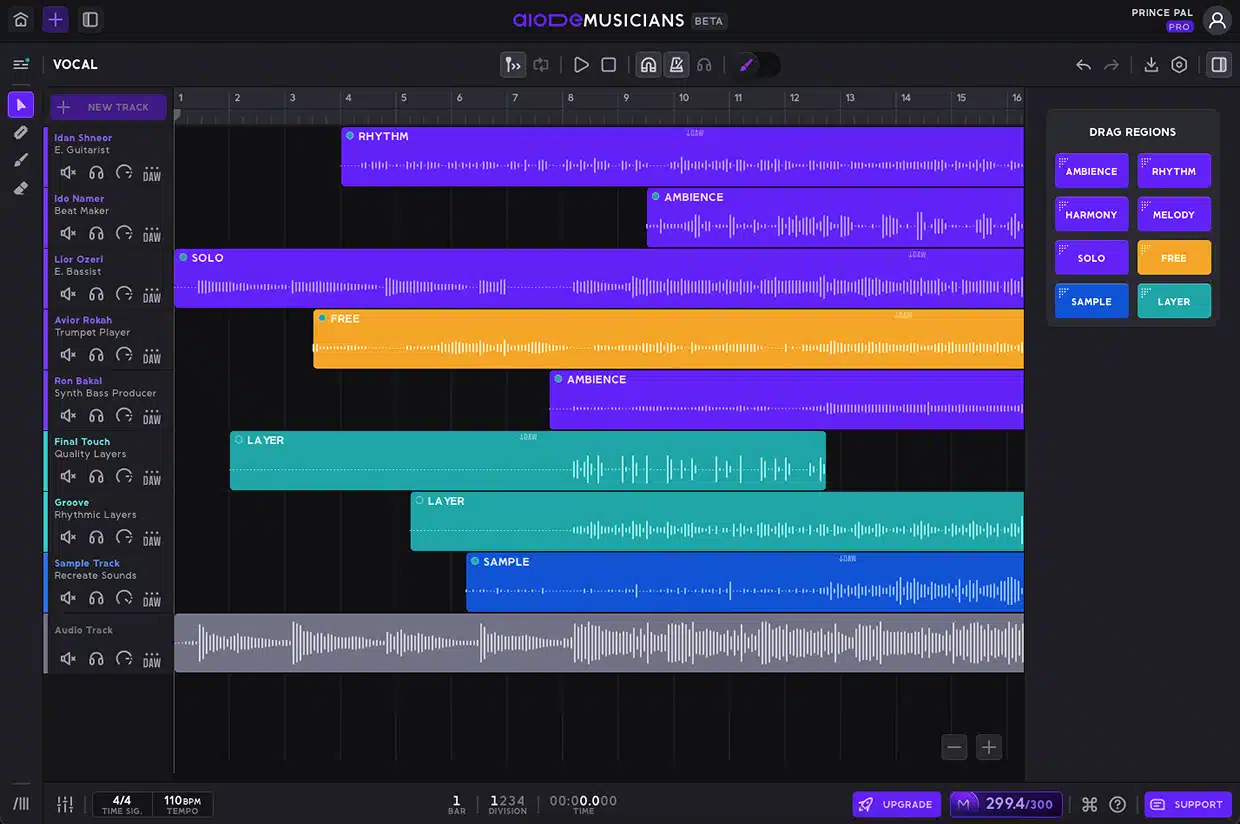
We’ve just rolled out one of the biggest UI updates Aiode has ever shipped. This release is built around a single goal: keeping you in the creative flow. With fewer screens, clearer actions, faster editing, and a more DAW-like experience from start to finish, Aiode continues to evolve as a professional music AI tool built for modern creators working with AI musicians. Below, we break down everything that’s new in this update.
A Completely New Fullscreen Editing Experience
We redesigned Aiode’s core layout to remove unnecessary navigation and keep everything you need within immediate reach. As an AI music production tool built for speed and clarity, the new interface centers around a single fullscreen workspace, eliminating the need to jump between multiple pages. Key elements now open contextually within the workspace, reinforcing Aiode’s role as an ultimate production tool for modern music creation:
- Mixer opening from the bottom
- Library opening from the left
- Performance tools, settings, and downloads opening as lightweight popups
Alongside the layout refresh, we introduced a new left-side editing toolbar designed to make editing faster and more fluid for creators working with AI musicians. As a professional music AI tool, Aiode now offers dedicated cursors that let you switch actions instantly without breaking your creative flow:
- Normal Pointer for dragging regions around
- Razor Tool for precise edits
- Generation Brush for quick idea creation
- Generation Eraser for clean, non-destructive removal
Rebuilt Action Bar for Faster Decisions
We rebuilt the action bar to help you make faster, more confident decisions while working. As an AI music production tool designed for real-world workflows, Aiode now surfaces actions exactly where they’re most relevant, reducing unnecessary movement and keeping your attention on the music. Region-specific actions live directly beneath the selected region, while Generate actions remain fixed at the bottom of the screen, reinforcing Aiode’s role as an ultimate production tool for efficient creation.
We also strengthened the connection between Performance controls and generation, tightening the loop between creative intent and output. As a professional music AI tool built around AI musicians, Aiode now enables the Generate button the moment performance parameters are adjusted, making it immediately clear when your ideas are ready to become new audio. This clarity removes guesswork and keeps the creative process moving forward without interruption.
Clearer Performance Controls
We introduced a series of small but meaningful UX improvements designed to reduce ambiguity and make interactions more intuitive across the platform. As an AI music production tool built for everyday use, Aiode focuses on clarity and immediate feedback, helping it function as an ultimate production tool that minimizes mental overhead and keeps you focused on the creative process.
Each performance parameter now displays its current state directly in the title, for example, clearly indicating whether a hook is on or off, so you always know what’s active at a glance. For creators working with AI musicians, this level of transparency is essential, and it’s a key reason Aiode continues to stand out as a professional music AI tool that supports faster decisions, fewer mistakes, and uninterrupted creative flow.
Expanded Editing Tools – Closer to a Real DAW
Editing and arranging in Aiode is now faster, more precise, and more familiar for production professionals. As an AI music production tool designed with real DAW workflows in mind, these improvements reduce friction and help position Aiode as an ultimate production tool where common actions feel immediately intuitive.
You can now work faster and with greater precision thanks to several new editing enhancements:
- Split regions at the playhead using Cmd/Ctrl + E
- Make precise cuts with the new razor cursor
- Instantly duplicate regions by Alt-dragging them in the timeline
- Edits snap to the nearest beat by default, with snapping easily toggled off for finer control
For creators looking for flawless control, this level of polish reinforces Aiode as a professional music AI tool that lets you move faster without relearning basic workflows.
Per project playback preferences
Playback settings in Aiode are now saved on a per-project basis, ensuring a more consistent and reliable working experience. As an AI music production tool built for real-world sessions, Aiode adapts the playback environment to each project instead of resetting between sessions, reinforcing its role as an ultimate production tool that keeps you focused and moving forward.
Key playback preferences are now remembered automatically:
- Metronome on/off state
- Auto-scroll preference
- Solo toggles
For creators working with AI musicians, this continuity is essential and further establishes Aiode as a professional music AI tool. When you reopen a project, everything is exactly how you left it, no surprises, no extra setup, just uninterrupted creative flow.
From Idea to Audio Faster: Aiode’s Most Streamlined UI Yet
This update represents a major step forward in how music is created inside Aiode, bringing clarity, speed, and a truly DAW-like experience to every stage of the workflow. From the redesigned fullscreen layout to smarter actions, clearer performance controls, and more familiar editing tools, every change is designed to help you stay in flow and focus on the music. The update is live now, so jump in, explore the new interface, and experience how Aiode continues to evolve as a professional music AI tool built for creators working with AI musicians.